Dashboard
The Dashboard is your command centre for monitoring chatbot performance, tracking customer interactions, and quickly accessing all plugin settings. All analytics now live here, so there is no separate Analytics page.
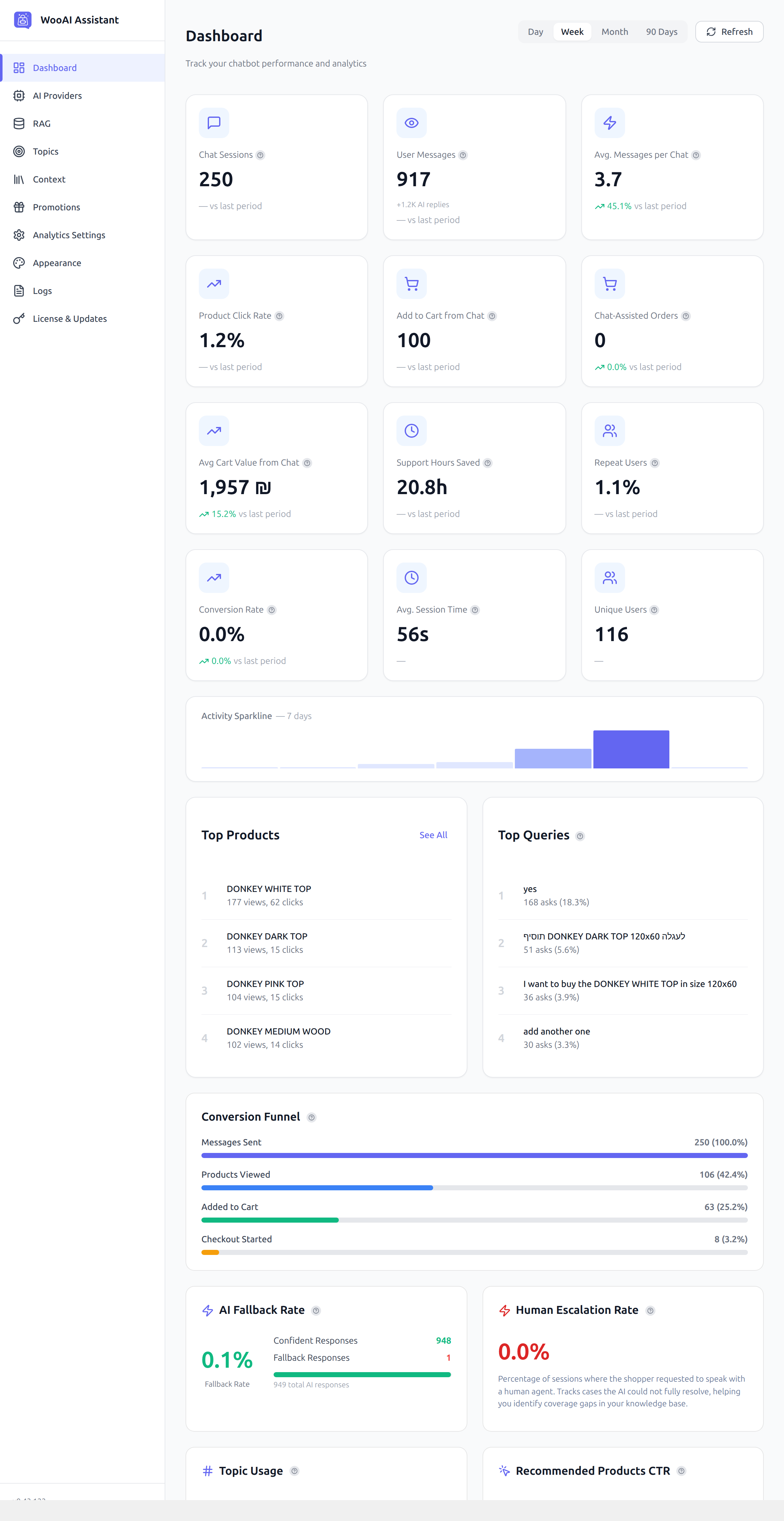
Accessing the Dashboard
Navigate to AI Chatbot → Dashboard in your WordPress admin menu. This is the default landing page when you click on the “AI Chatbot” menu item.
Key Performance Metrics: all 12 KPIs
The Dashboard displays 12 KPI cards, helping you understand how customers are interacting with your chatbot and how chat is affecting revenue:
Understanding the Metrics
- Chat Sessions: unique chat sessions started by customers (each browser visit that opened the widget counts as one)
- User Messages: all messages sent by customers across all sessions in the period
- Avg. Messages per Chat: mean number of customer messages per session; higher values indicate more engaged shoppers
- Product Click Rate: % of sessions where a product card was clicked inside the chat
- Add to Cart from Chat: % of sessions that added at least one product to cart through the chat widget
- Chat-Assisted Orders: orders placed by shoppers who used the chat in the same session
- Avg Cart Value from Chat: average order value for chat-assisted purchases; compare to your store-wide average to measure uplift
- Support Hours Saved: estimated support time offset by AI, calculated using the cost configuration in Analytics Settings
- Repeat Users: % of chat users who returned for a second session or more
- Conversion Rate: % of chat sessions that completed a purchase within the same session (single-unit funnel)
- Avg. Session Time: average duration of a chat interaction
- Unique Users: distinct visitor identities who started at least one chat session
Date Range Filter
Use the date range selector at the top right to filter all metrics and charts. Available ranges: Day, Week, Month, and 90 Days. All KPI cards update simultaneously.
Use the 90-day view to identify seasonal engagement patterns. Switch to the Week view to see which days of the week your customers are most active.
Dashboard Sections
Below the KPI cards, the Dashboard includes several detailed analytics sections:
Activity Sparkline
A compact chart showing conversation volume over time for the selected date range. Quickly spot traffic spikes or slow periods.
Top Products & Top Queries
- Top Products: most-viewed products in chat, ranked by views with click counts. Click See All for the full list.
- Top Queries: most common customer questions, ranked by frequency. Use this to identify gaps in your product catalog descriptions or knowledge base.
Conversion Funnel
A single-session funnel tracking how shoppers progress from sending a message to completing checkout. Four stages: Messages Sent → Products Viewed → Added to Cart → Checkout Started. Shows absolute counts and the percentage at each stage, so you can see where shoppers drop off.
AI Fallback Rate & Human Escalation Rate
- AI Fallback Rate: % of AI responses that fell back to a generic answer (could not fully resolve the query). Lower is better. Displays confident vs. fallback response counts.
- Human Escalation Rate: % of sessions where the shopper explicitly requested a human agent.
- Topic Usage: shows which conversation topics were triggered most, helping you tune your Topics configuration.
- Recommended Products CTR: click-through rate on AI-recommended product cards shown in chat.
- Promotion Performance: tracks how often active promotional messages were shown and clicked.
Navigation Menu
The sidebar provides quick access to all plugin sections:
System Notifications
The Dashboard may display important notifications at the top of the page:
- Configuration warnings: when required settings are missing (e.g., no AI provider configured)
- Update notifications: when a new plugin version is available
- License alerts: when your license is about to expire or needs attention
If you see a notice about “Demo Mode”, it means the RAG system (semantic search) is not configured. The chatbot will still work but will use basic keyword search instead of intelligent semantic matching.